手机258|



采购的一切问题都可以问采购专家小美!
企业营业执照已认证!
电话:86-0755-36649792
手机:15007557680
扫码通过手机查看

默认相册
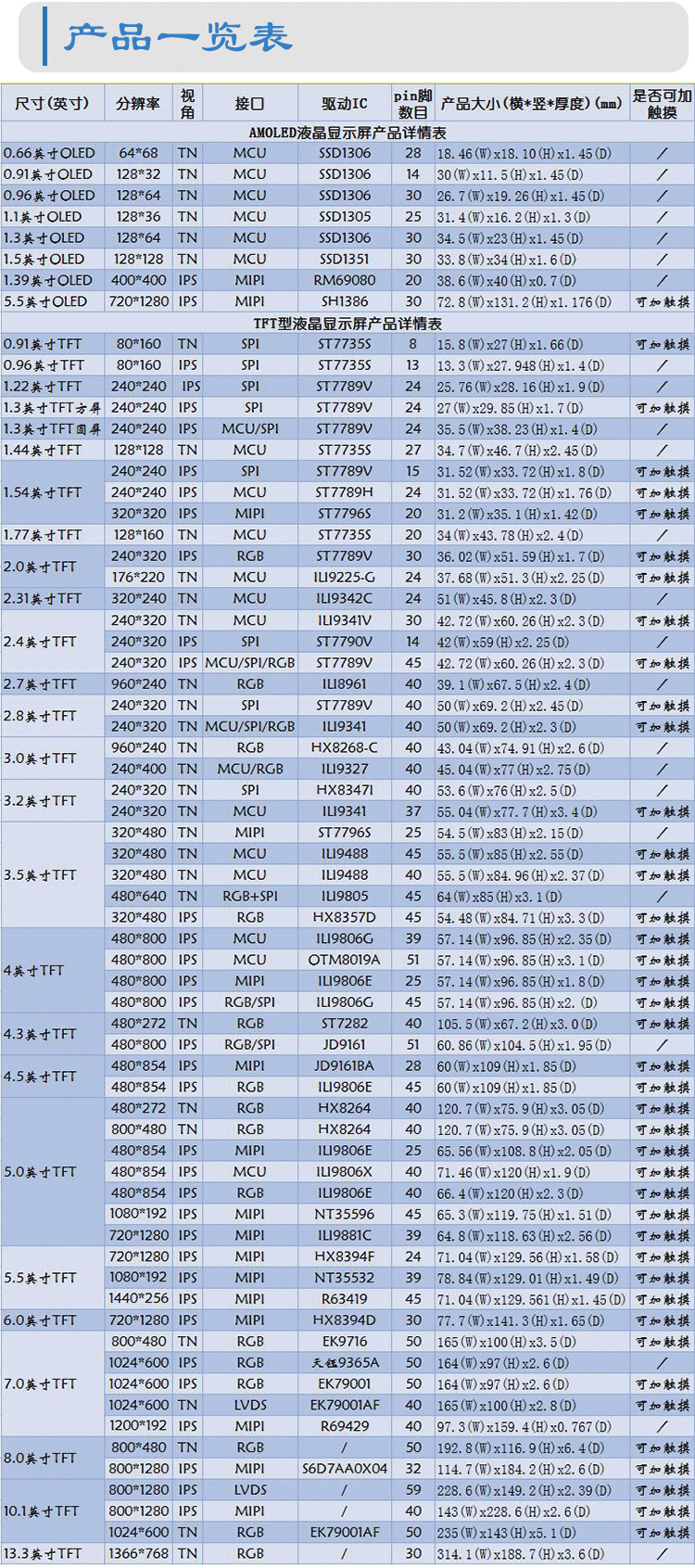
10.1英寸TFT型液晶显示屏 AMELIN/阿美林电子
13.3英寸TFT型液晶显示屏 AMELIN/阿美林电子
8英寸TFT型液晶显示屏 800X480
7英寸TFT型液晶显示屏 1024X600
5.5英寸TFT型液晶显示屏 1080X1920
5英寸TFT型液晶显示屏 720X1280 AMELIN
5英寸TFT型液晶显示屏 480X854 AMELIN
5英寸TFT型液晶显示屏 800X480 AMELIN
5英寸TFT型液晶显示屏 AMELIN/阿美林电子
4.5英寸TFT型液晶显示屏 AMELIN/阿美林电子

| 品牌 | 其他 | 型号 | SH430J26-00 |
| 加工定制 | 否 | 种类 | TFT型液晶屏(模块) |
| 屏幕尺寸 | 4.3 | 色彩 | 262K |
| 亮度 | 300CD/M^2 | 对比度 | 300:1 |
| 分辨率 | 480*272Pixel | 像素 | 30363PPI |
| 点距 | 0.22 | 响应时间 | 25 |
| 可视角度 | 60 |
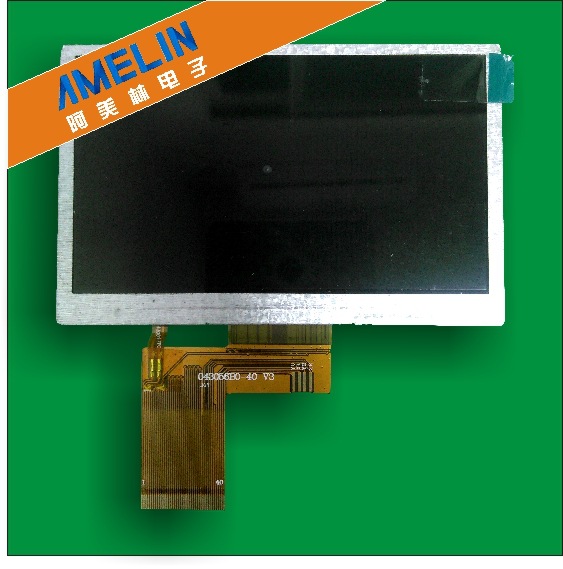
4.3英寸TFT液晶显示屏
General Deion
The SH430J26 model has a 4.3 inch diagonally measured active display area with 480(RGB)*272 resolution. Each pixel is divided into Red, Green and Blue sub-pixels and dots which are arranged in vertical stripes. LCD color is determined with 16.7M colors signal for each pixel.
The SH430J26 has been designed to apply the interface method that enables low power, high speed, and high co*trast.
The SH430J26 is intended to support applications where thin thickness, wide viewing angle and low power are critical factors and graphic displays are important.
Handing Precautions
(1) The display panel is made of glass and polarizer. As glass is fragile, it tends to become or chipped
during handling especially on the edges. Please *Void dropping or jarring. Do not subject it to a
mechanical shock by dropping it or impact.
(2) If the display panel is damaged and the liquid crystal substance leaks out, be sure not to get any in your mouth. If the substance contacts your skin or clothes, wash it off using soap and water.
(3) Do not apply excessive force to the display surface or the adjoining areas since this may cause the color tone to vary. Do not touch the display with bare hands. This will stain the display area and degraded insulation between terminals (some cosmetics are determined to the polarizer).
(4) The polarizer covering the display surface of the LCD module is soft and easily scratched. Handle this polarizer carefully. Do not touch, push or rub the exposed polarizers with anything harder than an HB pencil *** (glass, tweezers, etc.). Do not put or attach anything on the display area to *Void le*Ving marks on. Condensation on the surface and contact with termina*s due to cold will damage, stain or dirty the polarizer. After products are tested at low temperature they must be warmed up in a container
before coming is contacting with room temperature air.
(5) If the display surface becomes contaminated, breathe on the surface and gently wipe it with a soft dry cloth. If it is he*Vily contaminated, moisten cloth with one of the following solvents
- Isopropyl alcohol
- Ethyl alcohol
Do not scrub hard to *Void damaging the display surface.
(6) Solvents other than those above-mentioned may damage the polarizer. Especially, do not use the
following.
- Water
- Ketone
- Aromatic solvents
Wipe off saliva or water drops immediately, contact with water over a long period of time may cause deformation or color fading. *Void contacting oil and fats.
(7) Exercise care to minimize corrosion of the electrode. Corrosion of the electrodes is accelerated by water droplets, moisture condensation or a current flow in a high-humidity environment.
(8) Install the LCD Module by using the mounting holes.When mounting the LCD module make sure it is free of twisting, warping and distortion. In particular, do not forcibly pull or bend the I/O cable or the backlight cable.
(9) Do not attempt to disassemble or process the LCD module.
(10) NC terminal should be open. Do not connect anything.
(11) If the logic circuit power is off, do not apply the input signals.
(12) Since LCM has been assembled and adjusted with a high degree of precision, *Void applying excessive shocks to the module or making any alterations or modifications to it.
- Do not alter, modify or change the shape of the tab on the metal frame.
- Do not make extra holes on the printed circuit board, modify its shape or change the positions of components to be attached.
- Do not damage or modify the pattern writing on the printed circuit board.
- Absolutely do not modify the zebra rubber strip (conductive rubber) or heat seal connector.
- Except for soldering the interface, do not make any alterations or modifications with a soldering iron.
- Do not drop, bend or twist LCM.
Storage Precautions
When storing the LCD modules, the following precaution is necessary.
(1) Store them in a sealed polyethylene bag. If properly sealed, there is no need for the dessicant.
(2) Store them in a dark place. Do not expose to sunlight or fluorescent light, keep the temperature between 0°C and 35°C.
(3) The polarizer surface should not come in contact with any other objects. (We advise you to store them in the container in which they *** shipped).
Others
Liquid crystals solidify under low temperature (below the storage temperature range) ***ing to defective orientation or the generation of air bubbles (black or white). Air bubbles may also be generated if the module is subject to a low temperature.
If the LCD modules h*Ve been operating for a long time showing the same display patterns, the display patterns may remain on the screen as ghost images and a slight co*trast irregularity may also
appear. A normal operating status can be regained by suspending use for some time. It should be noted that this phenomenon does not adversely affect performance reliability. To minimize the performance degradation of the LCD modules resulting from destruction caused by static electricity etc., exercise care
to *Void holding the following sections when handling the modules.
- Exposed area of the printed circuit board.
-Terminal electrode sections.